 English
 русский
 Français
 عربى
 Español
 Português
 简体中文

Charging Table for Electronics: Power, Ports, and Campus Planning Guide
At a six seat library table, three students plug in laptops, two charge tablets, and one connects a phone. The nearest wall outlet is two meters away, so a power strip snakes across the floor. This is the moment a charging table stops being a furniture choice and becomes an electrical distribution decision. The useful answer is not to buy a table with as many USB ports as possible. It is to set a power budget, choose the right mix of AC and USB-C, manage cables inside the table, and verify the electrical parts can be serviced. A good charging table for electronics supports devices safely for years. A poor one creates tripping hazards, overloaded circuits, and dead ports in the first semester.
Content
- 1 Start with the power budget, not the port count
- 2 Choose the port mix that matches real devices
- 3 Where charging tables work in campus and office settings
- 4 Library and study tables need cable control
- 5 Mobile charging points for flexible rooms
- 6 Cable management and daily durability
- 7 Safety and procurement checks
- 8 A practical specification checklist
- 9 Match the table to the room before you order
Start with the power budget, not the port count
Begin with the number of seats and the devices each seat will support. A phone needs little power, a tablet can use 18 W to 30 W, and a laptop with USB-C Power Delivery often needs 45 W to 100 W. For a six seat table, plan 60 W to 80 W per seat if laptops are expected. That gives 360 W to 480 W before spare capacity. A standard 15 A branch circuit at 120 V has a theoretical maximum of 1,800 W, but continuous loads should stay well below that. Leave at least 20 percent headroom for chargers, monitors, and future devices. Also check total output, not just the rating printed next to a single port. Many multi port modules share their output, so a 65 W label may be the total for all ports rather than the power available to one laptop.
Choose the port mix that matches real devices
AC outlets remain the most flexible choice because they accept original laptop chargers, monitors, and specialty equipment. USB-C PD is the best choice for modern laptops, tablets, and phones, but verify the protocol and voltage range. USB-A is still useful for older phones and accessories, though it should not be the only option. Wireless charging is convenient for phones but slow and hard to service in a shared table. The table below summarizes the tradeoffs.
| Port type | Best use | What to verify |
|---|---|---|
| AC outlet | Laptop chargers, monitors, lab equipment | Grounded outlet, child shutter, and total circuit load |
| USB-C PD | Laptops, tablets, phones | PD voltage, per port wattage, and shared output |
| USB-A | Older phones and accessories | Current limit and port durability |
| Wireless pad | Phones during short use | Alignment, heat, and replacement access |
Where charging tables work in campus and office settings
Charging tables are most useful where people already sit for long periods and where fixed wall outlets are scarce. In classrooms, a movable charging point can support a teacher laptop, a projector adapter, and student devices without running cables across walking paths. In libraries, a reading table with a managed power module lets students study without blocking aisles. In dorms and common rooms, a small mobile table can serve as a shared charging station near seating. In offices, a table with AC and USB-C keeps meeting rooms free of loose adapters. The key is to match the table to the room, not to force one model into every space.
For teaching spaces that need power to move with the lesson, a rechargeable and adjustable podium can keep presentation devices charged while staying stable during use.
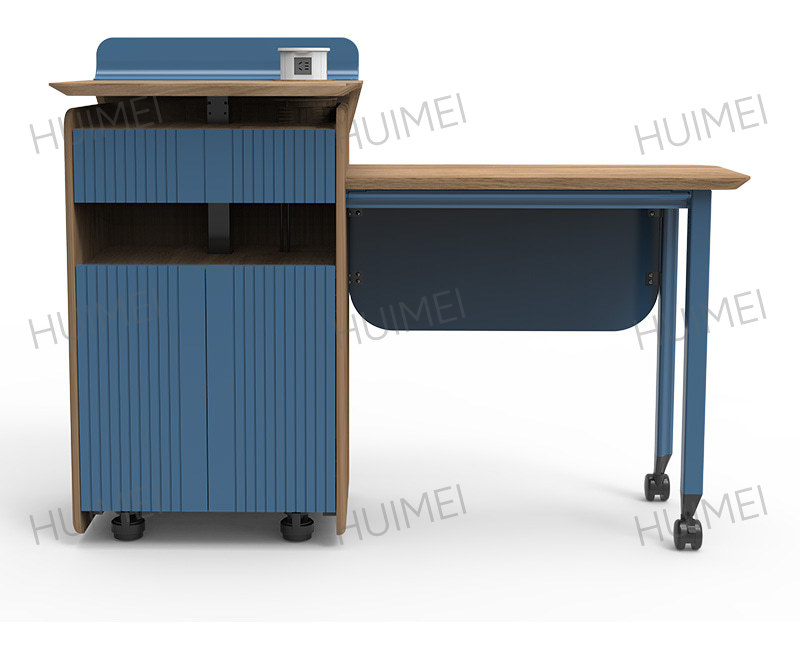 Mobile Rechargeable Adjustable Teaching PodiumA movable lectern with adjustable desktop height, storage levels, and customizable charging options for teaching spaces that need power to follow the lesson.View Product →
Library and study tables need cable control
Library tables face a different test. Seats are close together, users bring different chargers, and cleaning staff need to clear the surface quickly. Look for recessed power modules, flip up covers, and a cable tray that keeps cords below the work surface. The table edge should be smooth and the underside free of sharp brackets. If the table has a built in module, confirm that the module can be removed and replaced without cutting the table. A reading table that is comfortable for books should also leave enough knee clearance for a laptop and a power adapter.
A long reading or self study desk can be planned with a central power module and a below desk tray, so students charge devices without losing writing space.
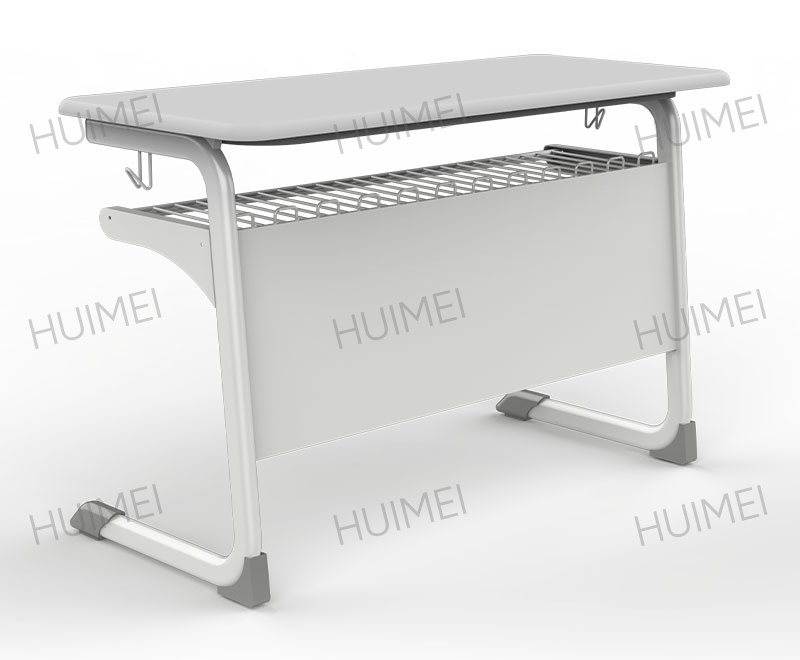 Reading and Self-Study Desk SeriesA reading and self-study desk line with single, double, cart, and splicing configurations, plus storage hooks and stable brackets for libraries and shared learning areas.View Product →
Mobile charging points for flexible rooms
Some rooms change use every hour. A training room may host a workshop in the morning and a parent meeting in the afternoon. In those spaces, a fixed table with a long power run is not always practical. A mobile small table or cart can carry a certified power strip and keep devices off the floor, then move back to a storage area. The cart should have locking casters, a stable base, and a route for the cable so it does not catch on door frames. Do not treat a furniture cart as an electrical enclosure. The power strip still needs overcurrent protection and a safe connection to the wall outlet.
For temporary or shared charging zones, a mobile small table and storage rack can support a compact charging station while keeping the floor clear.
Cable management and daily durability
Cable management is not a cosmetic detail. A charging table for electronics should route cords away from knees, wheels, and cleaning equipment. Look for a table with a cable channel, a vertical riser, or a removable back panel. The power module should sit flush or slightly recessed, with strain relief on each cord. Surfaces should tolerate daily cleaning. Powder coated steel frames and sealed edges on wood tops are practical because they resist chipping and moisture. Check that the table does not trap heat around the power module. If the module is enclosed, it needs ventilation and enough space for the adapter bricks. A simple test is to trace every cable from the device to the outlet. If any cable crosses a walkway or sits under a chair leg, the design needs revision.
Safety and procurement checks
Electrical safety comes before port convenience. Require certified power components, grounded connections, overcurrent protection, and a marked total load. The table should have a label that states the input voltage, maximum current, and total output. For school projects, ask for a sample inspection that includes the power module, the connection points, and the cable path. Confirm that the module is replaceable and that spare parts are available after installation. Also review the manufacturer's production and quality process. A supplier that controls metal, wood, and coating work can often resolve fit and finish issues faster than a trading company that assembles parts from several sources. The company background should show relevant school furniture experience, and the technical information should match the electrical parts actually supplied.
A practical specification checklist
Use this checklist during planning and again at delivery. It turns a vague request for a charging table into a set of verifiable requirements.
- Seat count and device mix: record how many laptops, tablets, and phones will use the table at peak.
- Power budget: set per seat wattage and total table wattage, then confirm circuit capacity with an electrician.
- Port plan: specify AC outlet count, USB-C PD voltage and wattage, and whether USB-A is needed.
- Shared output: require written confirmation of per port and total output.
- Cable path: define where cables enter, where they are stored, and how they stay off the floor.
- Service access: confirm the power module can be replaced without removing the table top.
- Materials: check frame coating, edge sealing, and cleaning instructions.
- Safety marks: require local electrical safety certification and a load label.
- Installation: confirm mounting, grounding, and testing responsibilities.
- Warranty and spares: ask for module, port, and cable replacement terms.
Match the table to the room before you order
The best charging table for electronics is the one that fits the room's power, furniture, and maintenance plan. A fixed library table with recessed modules suits long study sessions. A mobile cart or small table suits shared or temporary spaces. A rechargeable podium suits teaching areas where the power source must move with the presenter. Before ordering, walk the room with an electrician and a facilities technician. Mark the outlet locations, measure the cable runs, and test the door and aisle clearances. Then ask the supplier for a sample power module and a written load calculation. That step is faster than correcting a table that cannot be serviced or a circuit that trips during the first week of classes.
If you are planning a campus or office furniture package, contact the team with the seat count, device mix, and room layout so the power and furniture specification can be reviewed together.
Copyright© Zhejiang Huimei Industry & Trade Co., Ltd. All Rights Reserved.
Professional School Furniture Manufacturer School Furniture Supplier